Executive Summary
Pagination is where API performance goes to die quietly. Offset pagination ships fast, breaks at scale, and creates data consistency problems that only surface under load. Cursor and keyset pagination solve different subsets of those problems at different operational costs. Choosing the wrong strategy in year one means a painful migration in year three — after your clients have already built around your broken default. This article covers how my team evaluates, implements, and migrates between pagination strategies in production SaaS systems.
The Real Problem This Solves
Every API that returns collections needs pagination. What most teams do not realize until too late is that the pagination strategy they choose is not just a performance decision — it is a data consistency decision, a client contract decision, and a scalability ceiling decision all at once.
The symptom that finally forces the conversation is always the same: a customer reports missing records in a data export, or a background sync job starts producing duplicates, or a SELECT COUNT(*) query that worked fine at 10,000 rows starts timing out at 10 million. By that point, the pagination strategy is baked into client SDKs, documented in integration guides, and relied upon by dozens of external consumers. Changing it is a versioning problem on top of a performance problem.
My team has rebuilt pagination layers at three different companies. The pattern is identical each time: offset pagination was chosen because it was the obvious default, nobody modeled the failure modes, and the migration cost exceeded the original implementation cost by an order of magnitude. This article is the analysis those teams wish they had done upfront.
Offset Pagination: The Default That Does Not Scale
How It Works
Offset pagination is the SQL LIMIT and OFFSET pattern surfaced directly to the API consumer:
GET /orders?page=3&per_page=50Internally, this translates to:
SELECT * FROM orders ORDER BY created_at DESC LIMIT 50 OFFSET 100;
```

The client controls which page they want. The server skips `(page - 1) * per_page` rows and returns the next batch.

### Why Teams Choose It

It is simple to implement, simple to explain, and matches how humans think about pages in a book. It supports random access — a client can jump directly to page 47 without traversing pages 1 through 46. Building a UI with numbered page controls is trivial. Total record counts are easy to surface, which lets you render "Page 3 of 127" in your interface.

### Where It Breaks

**The count query problem.** To tell a client "Page 3 of 127," you need to know the total record count. That requires a `SELECT COUNT(*)` query. On tables with millions of rows, this query is expensive — often more expensive than the data query itself. PostgreSQL does not maintain an exact live row count; it estimates, and getting the exact number requires a sequential scan. At scale, my team has seen count queries take 4–8 seconds on tables with 50 million rows. That latency is unacceptable on a paginated list endpoint.

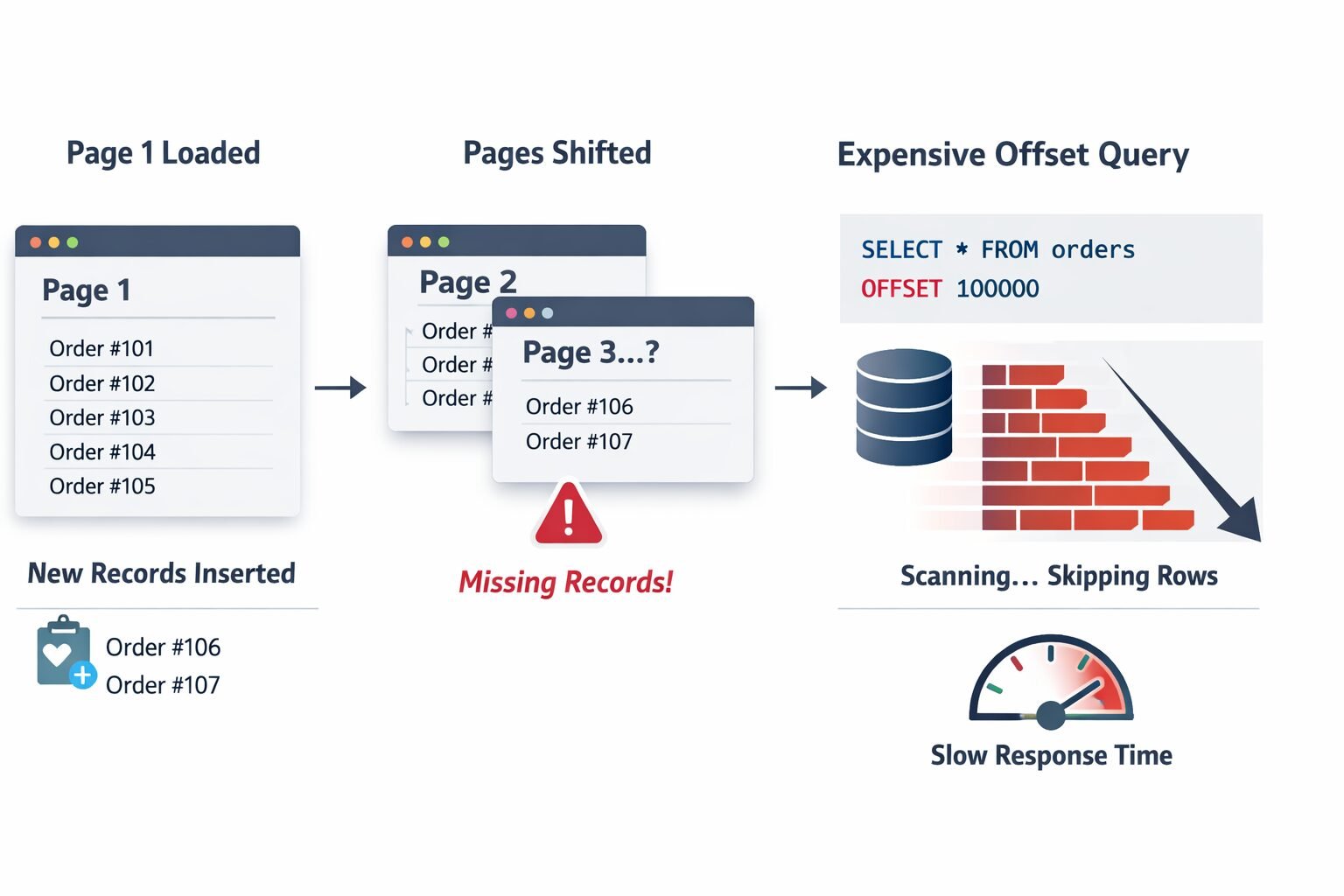
**The moving window problem.** Between page 1 and page 2 of a client's traversal, new records can be inserted. If a new order is created while a client is paginating through the order list sorted by `created_at DESC`, every subsequent page shifts by one row. Records that were on page 2 when the client loaded page 1 are now on page 3. The client misses them entirely. This is not a theoretical edge case — it is the default behavior of offset pagination under concurrent write load, which describes every production SaaS system.

**The database performance problem.** `OFFSET 100000` does not skip 100,000 rows cheaply. The database engine reads and discards those rows before returning your result set. The higher the offset, the more work the database does. A client paginating to page 2,000 of a 50-per-page result set is asking your database to read and discard 99,950 rows on every request. This is why offset pagination has a performance cliff that appears suddenly at scale and is difficult to optimize away without changing the pagination strategy entirely.

### When Offset Pagination Is Actually Fine

Despite its failure modes, offset pagination is the right choice in specific contexts. If your dataset is small and bounded — under 100,000 records and growing slowly — the performance problems never materialize. If your UI genuinely needs numbered page controls with total counts, offset is the only clean option. If writes to the paginated dataset are infrequent enough that the moving window problem is negligible, offset is simpler to operate. My team uses offset pagination for admin interfaces, reporting dashboards with bounded datasets, and any context where the consumer is a human looking at a screen rather than a machine processing records in bulk.

---

## Cursor Pagination: Stability at the Cost of Flexibility

### How It Works

Cursor pagination replaces page numbers with an opaque pointer to a position in the result set. The server returns a cursor with each response, and the client passes that cursor back to get the next page.
```
GET /orders?limit=50
→ returns 50 records + cursor: "eyJpZCI6MTIzfQ=="

GET /orders?cursor=eyJpZCI6MTIzfQ==&limit=50
→ returns next 50 records + next cursor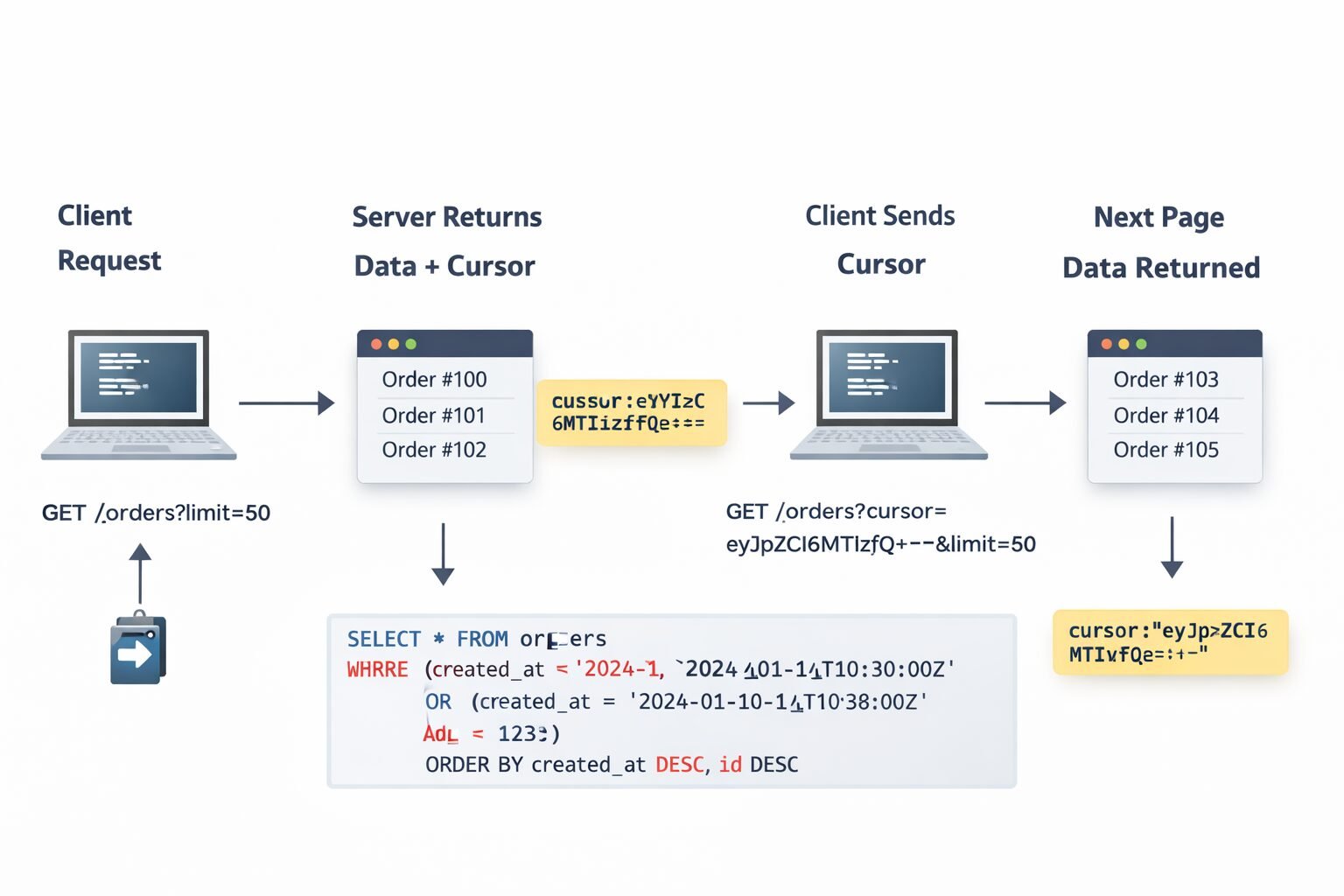
The cursor encodes the position — typically the ID or sort key of the last record returned. My team encodes cursors as base64 JSON objects rather than raw values, which makes them opaque to clients and gives us flexibility to change the internal cursor structure without breaking the client contract.
Internally, the cursor decodes to something like {"id": 123, "created_at": "2024-01-15T10:30:00Z"} and the query becomes:
SELECT * FROM orders
WHERE created_at < '2024-01-15T10:30:00Z'
   OR (created_at = '2024-01-15T10:30:00Z' AND id < 123)
ORDER BY created_at DESC, id DESC
LIMIT 50;
```

### Why Cursor Pagination Solves the Moving Window Problem

Because the cursor encodes an absolute position in the result set rather than a relative offset, new records inserted during traversal do not shift the window. A client paginating through orders will see a stable, consistent view of the data as it existed at the time they started traversing — new orders appear at the front of the list but do not corrupt the pagination state for in-progress traversals.

This is the property that makes cursor pagination the right choice for background sync jobs, data exports, and webhook delivery systems. Any process that needs to reliably traverse a complete dataset without missing or duplicating records needs cursor-based stability. My team uses it by default for all machine-to-machine API consumption.

### The Limitations Cursor Pagination Does Not Solve

**No random access.** A client cannot jump to page 47. They must traverse sequentially. This rules out cursor pagination for any UI that needs numbered page controls or allows users to jump to arbitrary positions.

**No total counts.** You cannot tell the client "50 of 1,247 records." The cursor approach gives you a `has_next_page` boolean and nothing more. Some clients find this acceptable. Others — particularly enterprise customers who want to track export progress — find it frustrating.

**Cursor invalidation.** If the sort order changes or records are deleted, existing cursors can become invalid or produce unexpected results. My team handles this by treating cursors as short-lived — encoding a timestamp and rejecting cursors older than 24 hours — and returning a clear error when a cursor is invalid rather than silently returning wrong data.

**Complexity of multi-column sort cursors.** When sorting by multiple columns, the cursor query becomes a multi-column inequality. With two sort columns this is manageable. With three or more it becomes difficult to read, difficult to index correctly, and easy to get wrong. My team caps cursor-paginated endpoints at two sort columns and pushes complex sorting requirements to a separate search or export endpoint.

---

## Keyset Pagination: Performance Correctness at the Database Level

### How It Works

Keyset pagination is cursor pagination done with the database's native capabilities rather than application-level position encoding. Instead of encoding position in an opaque cursor, you use the actual indexed column values directly as filter predicates.
```
GET /orders?after_id=12345&limit=50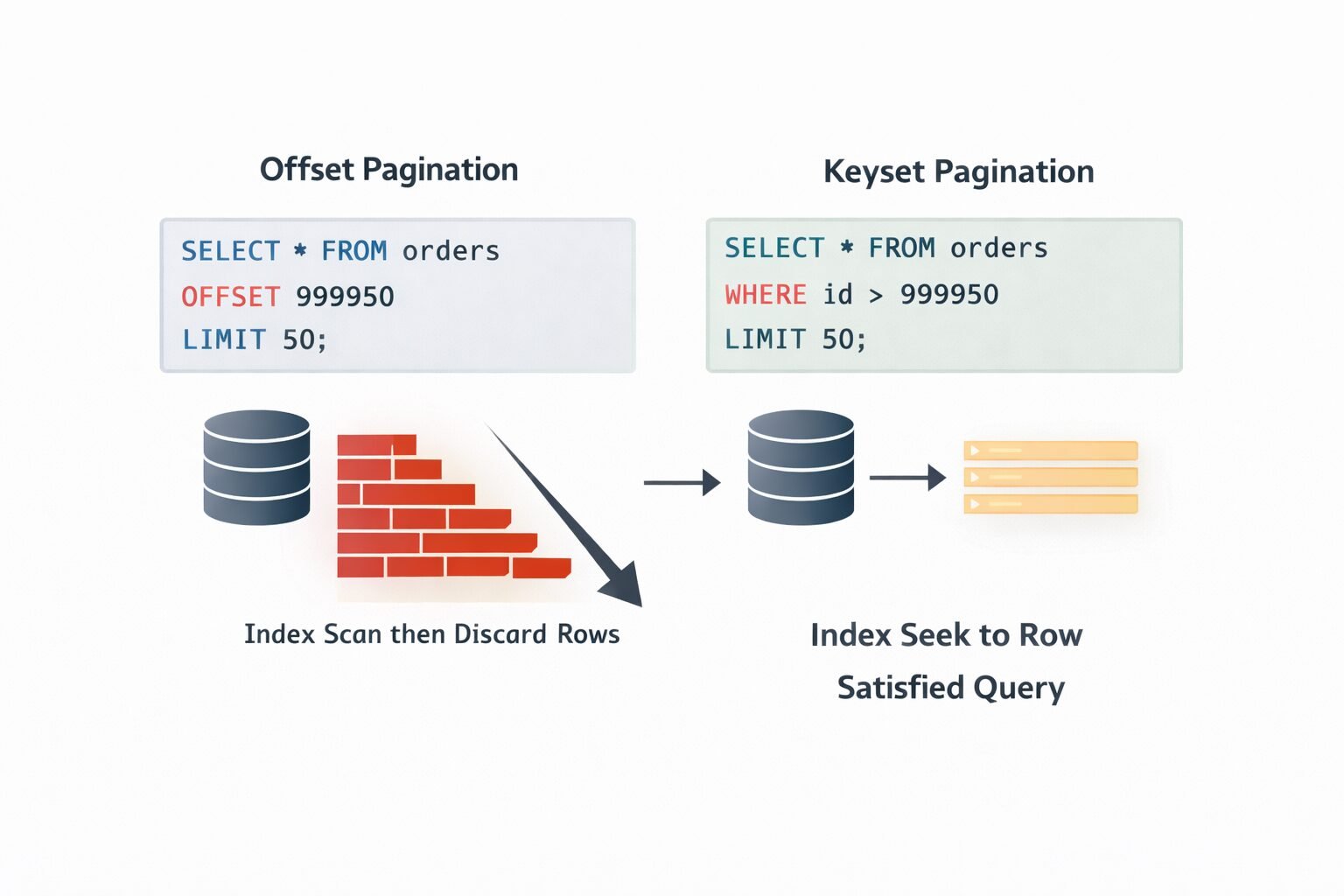
Internally:
SELECT * FROM orders
WHERE id > 12345
ORDER BY id ASC
LIMIT 50;
The client receives the ID of the last record and passes it back as after_id on the next request. There is no encoding or decoding — the position is a first-class value.
Why Keyset Is the Fastest Option
The database can satisfy a keyset query using a standard B-tree index seek. It does not scan and discard rows the way offset does, and it does not require the application layer to encode and decode position state the way cursor pagination does. For a table with 100 million rows and an index on id, a keyset query for id > 99999950 is essentially constant time regardless of how deep into the result set you are.
This is the pagination strategy my team reaches for when the table is large, the sort order is stable, and the performance ceiling matters. Feeds, activity streams, audit logs, and financial transaction histories are all natural fits. If you are building high-performance sites with Next.js and Vercel, keyset pagination on your data layer is what keeps API response times flat as your dataset grows.
Where Keyset Pagination Falls Short
The sort key must be unique and indexed. Keyset pagination requires a stable, unique sort key. Auto-incrementing integer IDs are the ideal case. created_at timestamps are problematic because they are not unique — two records can have identical timestamps, which makes the keyset boundary ambiguous. My team always uses a composite keyset of (created_at, id) when sorting by timestamp, which ensures uniqueness while preserving the sort order clients expect.
No random access, no total counts. Same limitations as cursor pagination. Keyset is sequential traversal only.
Sorting flexibility is limited. Keyset pagination works cleanly when clients always sort by the same indexed column. The moment you allow arbitrary sort fields — “sort by customer name” or “sort by order total” — the keyset approach requires indexes on every sortable column and becomes significantly more complex to implement correctly.
Choosing the Right Strategy: A Decision Framework
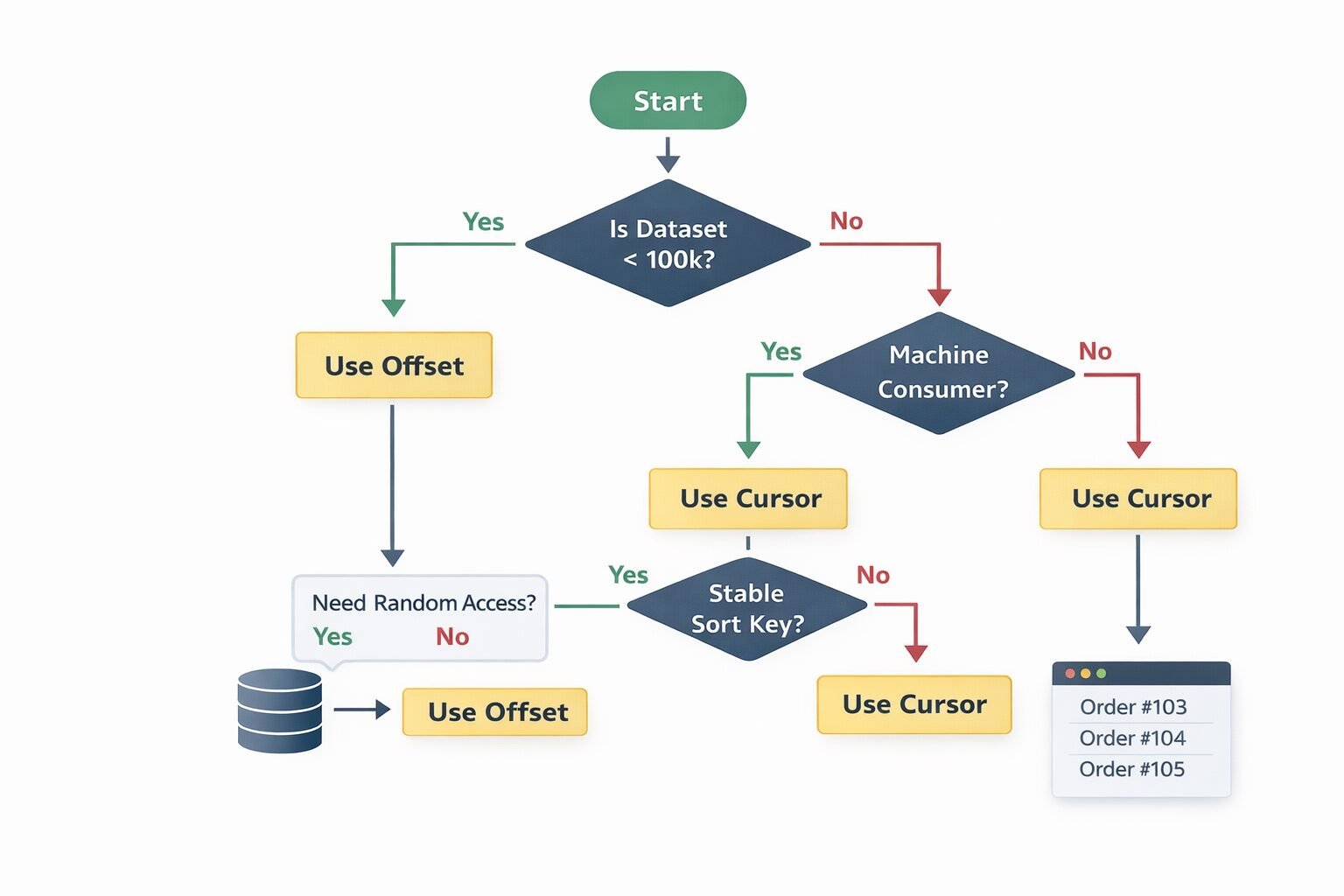
My team uses a straightforward decision framework when designing a new collection endpoint:
Start by asking who the consumer is. Human users navigating a UI have different needs than machines processing data in bulk. UI consumers often need total counts and random access. Machine consumers need consistency and performance.
Ask whether the dataset is bounded. Under 100,000 records with slow growth: offset pagination is fine. Over 1 million records or growing rapidly: offset pagination will cause problems.
Ask whether sort order matters more than insert order. If clients need to sort by arbitrary fields, cursor pagination with multi-column sort support is more flexible than keyset. If clients always sort by a stable primary key or timestamp, keyset is faster and simpler.
Ask whether consistency under concurrent writes matters. Background sync jobs, data exports, and audit processes need cursor or keyset. Admin UIs with low write volume can tolerate offset.
The resulting decision matrix:
- Small bounded dataset, UI consumer, needs total counts → Offset
- Large dataset, UI consumer, sequential navigation only → Cursor
- Large dataset, machine consumer, high write volume → Cursor or Keyset
- Extremely large dataset, stable sort key, performance critical → Keyset
- Arbitrary sort fields required → Cursor with multi-column support
Response Shape That Works Across All Three Strategies
My team standardizes on a pagination envelope that accommodates all three strategies without requiring clients to handle structurally different responses:
{
  "data": [...],
  "pagination": {
    "total": 1247,
    "page": 3,
    "per_page": 50,
    "next_cursor": null,
    "prev_cursor": null,
    "has_next_page": true,
    "has_prev_page": true
  }
}
For offset pagination, total, page, and per_page are populated. next_cursor and prev_cursor are null.
For cursor and keyset pagination, next_cursor and prev_cursor are populated. total and page are null or omitted.
has_next_page and has_prev_page are always populated regardless of strategy. This gives clients a consistent way to determine whether to continue traversal without switching on which pagination mode they are in.
This envelope design matters when you are building and documenting APIs with OpenAPI — a consistent pagination schema means your spec can define the envelope once and reference it across every collection endpoint rather than defining bespoke pagination shapes per resource.
Security Implications
Cursor Tampering
If cursors encode position state that influences query behavior, a tampered cursor is a potential injection vector. My team signs cursors with an HMAC using a server-side secret key. Before decoding a cursor, the server verifies the signature. An invalid signature returns a 400 Bad Request with a clear error message. This prevents clients from manually constructing cursors that probe database state or bypass access controls.
Information Leakage in Cursor Values
Opaque base64 cursors that clients can decode to extract record IDs or timestamps leak information about your data model and record distribution. While base64 is not encryption, it creates a false sense of opacity. My team uses encrypted cursors for sensitive endpoints — particularly those that paginate over financial records or user data. The overhead is negligible and the information leakage risk is eliminated.
Offset Enumeration
Offset pagination with predictable page sizes enables dataset enumeration. A client who discovers GET /users?page=1&per_page=100 can iterate through every page and harvest your entire user list. This is not a pagination problem specifically — it is an authorization problem — but offset pagination makes enumeration trivially automatable. My team applies strict rate limiting for APIs on paginated list endpoints and requires authentication scopes that explicitly grant list access. Understanding what a good API rate limit is for public APIs is directly relevant here — list endpoints that support offset pagination need tighter rate limits than point-lookup endpoints because the enumeration risk is higher. You can also reference API rate limiting strategies for high-traffic applications for deeper guidance on protecting paginated endpoints specifically.
Tenant Isolation in Cursor Decode
In multi-tenant SaaS systems, cursors must be scoped to the authenticated tenant. A cursor generated for tenant A must not return valid results when submitted by tenant B — even if tenant B correctly signs the cursor. My team encodes the tenant ID into the cursor payload and validates it against the authenticated request context before executing the query.
Performance Bottlenecks in Detail
The Offset Cliff
Offset performance degrades predictably with dataset size and page depth. The degradation curve is roughly linear with offset value on a table without partitioning. At 10,000 rows offset, query time might be 5ms. At 1,000,000 rows offset, the same query might take 800ms. This is not a problem you can index your way out of — the OFFSET clause is evaluated after the index scan, not before it.
One partial mitigation my team uses for legacy offset endpoints is the “late row lookup” pattern: paginate over IDs only first, then join back to the full row data. The index-only scan is faster than scanning full rows, and the join retrieves only the final page’s worth of full records. This reduces offset query time by 40–60% at deep offsets without changing the API contract.
Cursor Query Plan Stability
Multi-column cursor queries — WHERE (created_at, id) < ($1, $2) — can produce unstable query plans depending on the database’s statistics about column cardinality. My team monitors query plan changes on cursor endpoints using EXPLAIN ANALYZE in production and locks query plans using prepared statements on high-frequency endpoints to prevent plan regression after statistics updates.
Index Design for Keyset Pagination
Keyset pagination is only fast if the sort column is indexed correctly. For a query like WHERE id > 12345 ORDER BY id ASC LIMIT 50, you need an index on id — trivially satisfied by the primary key. For WHERE created_at > $1 ORDER BY created_at ASC, id ASC LIMIT 50, you need a composite index on (created_at, id). My team audits index usage on all keyset endpoints with pg_stat_user_indexes to catch cases where the planner falls back to a sequential scan due to a missing or unused index.
Common Mistakes My Team Has Seen
- Using offset pagination by default without modeling the dataset growth curve. A table that has 50,000 rows today will have 5 million in two years. Model for year three, not year one.
- Not signing or encrypting cursors. Opaque does not mean tamper-proof. Sign every cursor.
- Sorting by non-unique columns in keyset pagination.
created_atwithout a tiebreaker produces unstable pages where records at the boundary appear on multiple pages or are skipped entirely. - Running count queries on every paginated request. Cache total counts with a short TTL rather than querying on every request. An exact count that is 30 seconds stale is acceptable in virtually every UI context.
- Returning different pagination envelope shapes across endpoints. Clients should not need to handle structurally different pagination responses for different resources. Standardize the envelope globally.
- Not handling cursor invalidation gracefully. A cursor that references a deleted record should return a clear, actionable error — not a silent empty result set. My team returns a specific error code
cursor_expiredorcursor_invalidthat clients can handle explicitly. This connects to broader guidance on when an API should return 400 — an invalid cursor is a client error, not a server error, and should return a 400 with a descriptive error code. - Mixing pagination strategies across the same API without documentation. If
/usersuses cursor pagination and/ordersuses offset pagination, document the difference explicitly at the resource level. Undocumented inconsistency in a well-designed REST API for SaaS is a support ticket waiting to happen.
When Not to Use Cursor or Keyset Pagination
Cursor and keyset pagination are not universally better than offset — they solve specific problems at the cost of flexibility. There are cases where those trade-offs are the wrong ones to make.
When clients need total counts. Export UIs, progress bars, and bulk operation confirmations all require knowing the total record count. Neither cursor nor keyset provides this cleanly. If the UI genuinely needs total counts, offset pagination with a cached count query is the more honest choice.
When clients need random access. “Jump to page 50 of 200” requires offset. There is no cursor-based equivalent for arbitrary position access. Administrative tools, data review workflows, and audit interfaces with heavy navigation requirements belong on offset.
When the dataset is small and static. If you are paginating a list of 200 country codes that never changes, the operational complexity of cursor management is pure overhead. Offset pagination on a bounded, slow-changing dataset is the pragmatic choice.
When sort flexibility is a core requirement. If your clients need to sort by arbitrary user-defined fields — a common requirement in GraphQL vs REST for SaaS comparison contexts where GraphQL’s flexible querying often influences REST API design expectations — cursor and keyset pagination become significantly more complex to implement correctly across all possible sort combinations.
Enterprise Considerations
Enterprise integrations are almost always machine-to-machine. A customer connecting your API to their data warehouse, their ERP system, or their custom analytics pipeline needs cursor or keyset pagination — not offset. Their sync jobs run on schedules, handle interruptions, and need to resume from the last known position without missing or duplicating records.
My team documents pagination strategies at the resource level in our API reference, not just globally. For each collection endpoint, the documentation specifies which strategy is used, what the cursor encodes, how long cursors are valid, and what error codes to expect on cursor invalidation. Enterprise integration teams build resilient sync clients from this information — vague documentation about pagination behavior generates enterprise support escalations that consume disproportionate engineering time.
Bulk export endpoints are a separate concern from paginated list endpoints. For customers who need to export millions of records, my team provides a dedicated async export endpoint that generates a file rather than forcing the client to paginate through thousands of pages. This decouples the export use case from the real-time pagination use case and avoids the failure modes of deep pagination entirely. Pairing this with automated invoice generation patterns shows how file-based export sidesteps pagination problems completely for bulk data delivery.
SLA implications: Enterprise SLAs should specify pagination consistency guarantees. A sync job that misses records because of the moving window problem is a data integrity issue, not just a performance issue. Documenting that cursor-paginated endpoints guarantee no-skip, no-duplicate traversal under concurrent writes is a contractual commitment that enterprise customers evaluate seriously during procurement.
Cost & Scalability Implications
The infrastructure cost of pagination strategy is dominated by database query cost, not application logic.
Offset pagination at high page depths adds CPU and I/O load to your database that scales linearly with offset value. At millions of rows and deep offsets, this load is measurable in database CPU graphs and can affect query performance across the entire system — not just the paginated endpoint. My team has seen offset pagination on a busy table degrade unrelated queries by 15–20% during peak export traffic because of shared buffer pool contention.
Cursor and keyset pagination have essentially flat database cost regardless of position in the result set. A query for the ten-millionth record is as fast as a query for the first record when using keyset pagination with a proper index. This flat cost profile is what makes cursor and keyset suitable for large-scale data pipelines and background sync workloads.
The operational cost difference compounds with dataset growth. A system that handles offset pagination fine today at 500,000 records may need emergency database upgrades at 50 million records — not because of overall query volume, but because deep offset queries become unacceptably expensive. Planning for keyset pagination from the start eliminates this scaling cliff entirely.
For teams running API rate limiting strategies for high-traffic applications, pagination strategy directly affects how you configure limits. Offset pagination endpoints need tighter rate limits at deep pages because the database cost per request increases with depth. Keyset endpoints can carry higher rate limits because the cost per request is constant regardless of position.
Implementing This Correctly: A Strategic Perspective
Pagination strategy is a decision that compounds over time. The wrong choice does not fail immediately — it degrades gracefully for months or years until a scale threshold is crossed, and then the failure mode is sudden and expensive to remediate.
My team’s implementation process starts with dataset modeling before writing any code. What is the current row count? What is the projected growth rate over two years? Who are the consumers — humans, machines, or both? Do they need total counts? Do they need random access? These questions determine the strategy before a single line of route handler is written.
The second step is building a consistent pagination envelope that abstracts the strategy from the client where possible. Clients should not need to know whether they are on an offset or cursor endpoint to consume paginated results. The has_next_page field and the next_cursor or next_page field carry the traversal state in a strategy-agnostic way.
The third step is treating pagination as part of your API versioning strategy. A change in pagination strategy is a breaking change for machine consumers. When my team has needed to migrate from offset to cursor on a live endpoint, we treat it the same way we treat any breaking API change — new version, migration guide, extended support window for the old behavior, active outreach to consumers with deep-offset usage patterns identified from access logs.
APIs that paginate correctly at scale are APIs that enterprise customers trust with their data pipelines. Pagination is invisible when it works and catastrophic when it does not. Build the strategy that matches your growth curve, document the guarantees you are making, and treat pagination as the data integrity contract it actually is.

Finly Insights Team is a group of software developers, cloud engineers, and technical writers with real hands-on experience in the tech industry. We specialize in cloud computing, cybersecurity, SaaS tools, AI automation, and API development. Every article we publish is thoroughly researched, written, and reviewed by people who have actually worked in these fields.