Let me tell you a story. In 2024, I built a small web app for a friend's bakery in Chennai. I thought I was smart. I rented a traditional virtual machine (VM) on some cheap hosting, installed everything manually, and deployed the app. Cost? Around ₹1,000/month. Fixed. Predictable. I felt like a genius.
Then came Diwali week. The bakery ran a huge discount offer. Traffic exploded — from 50 visitors a day to 5,000 in an hour. My little VM crashed. The site went down. My friend lost orders. He was angry. I was embarrassed.
That night, I learned about serverless architecture. I spent the weekend migrating his app to AWS Lambda. The next week, traffic spiked again — but this time, the serverless functions automatically scaled. No crash. No angry calls. I paid only for the actual compute time, which was surprisingly low (about ₹300 for the whole festive month).
So what's the difference between serverless vs traditional architecture? Let me break it down the way I wish someone had explained it to me — with failures, real examples, and no corporate jargon. (Here's our complete guide to serverless vs traditional — but let's go deeper.)
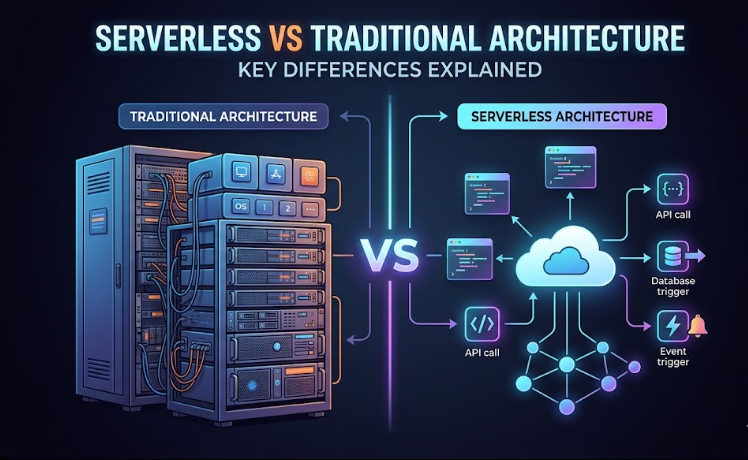
Traditional architecture — the "own a car" model
Traditional architecture (or server‑based) means you rent or buy a server (physical or virtual) and you manage everything yourself. You choose the operating system, install software, deploy your code, and keep it running. You pay for the server whether it's busy or idle.
Think of it like owning a car. You buy it, pay insurance, maintenance, and parking — even if you don't drive it for a week. It's always there, but you're responsible for everything. When traffic spikes (like a sudden trip), your single car might not be enough. You could buy another car, but that takes time and money.
I made this mistake with the bakery app. I had one small VM. When traffic spiked, it crashed. I tried to add more VMs manually, but by the time they spun up, the sale was over. Total waste of time and reputation.
Serverless architecture — the "ride‑hailing" model
Serverless architecture means you just upload your code (as functions), and the cloud provider runs it only when needed. You don't see, manage, or pay for idle servers. The provider automatically scales from zero to thousands of concurrent executions.
It's like using a ride‑hailing app. You don't own a car. You open the app, request a ride when you need one, and pay per trip. No maintenance, no insurance. If suddenly 100 people need rides, the app sends 100 cars instantly. That's serverless scaling.
After my bakery VM crashed, I moved the app to AWS Lambda. The function would run only when someone visited the website. During the next Diwali rush, Lambda automatically spun up hundreds of instances. No crash. And I paid only for the actual compute time — about ₹300 for the month, compared to ₹1,000 for the always‑on VM. Great value.
Quick comparison table (what you actually care about)
| Aspect | Traditional (VM) | Serverless (Lambda/Cloud Functions) |
|---|---|---|
| Cost model | Pay for idle time (server runs 24/7) | Pay only when code runs (per request + compute time) |
| Scaling | Manual or auto‑scaling groups (minutes to hours) | Automatic, instant, massive scale |
| Maintenance | You do OS updates, patches, monitoring | Provider handles everything |
| Cold starts? | No — server always warm | Yes — first request after idle can be slow (100-500ms) |
| Max execution time | Unlimited (long‑running tasks OK) | Limited (e.g., 15 minutes for AWS Lambda) |
| Best for | Steady traffic, long processes, full control | Bursty traffic, event‑driven tasks, low ops overhead |
Serverless — pros and cons (from my messy experience)
Pros:
- No server management: I never log into a server anymore. Just upload code and it runs. My weekends are free.
- Automatic scaling: The bakery app didn't crash again. Lambda handled everything.
- Pay only for what you use: For low‑traffic side projects, I pay literally ₹5-₹10 a month. Sometimes less than a snack.
- Fast deployment: I can deploy a new function in seconds. Great for experiments.
Cons (and I've felt them):
- Cold starts: One of my functions was rarely used. When someone called it after an hour of silence, it took 3 seconds to respond. That user left. Now I keep it warm with a ping every 5 minutes (a small workaround).
- Execution limits: AWS Lambda has a 15‑minute max. I had a data processing job that ran for 30 minutes. Couldn't run on Lambda. Had to move to a traditional VM. Annoying.
- Vendor lock‑in: I wrote functions using AWS‑specific tools. Moving to Google Cloud would require rewriting. Not impossible, but painful.
- Debugging is harder: When a function fails, logs are scattered. I spent 2 hours once figuring out why a function timed out — turned out I had an infinite loop. On a traditional server, I could have just logged in and seen the CPU spike. On serverless, it was more detective work.
Traditional architecture — pros and cons
Pros:
- Full control: You can install any library, any operating system, any unusual dependency. For a client who needed an old PHP version, a traditional VM was the only way.
- Predictable cost: ₹1,000/month fixed. Easy to budget. No surprises.
- No cold starts: Consistent performance. Good for real‑time apps.
- Long‑running tasks: I run a nightly backup script that takes 2 hours. Works fine on a traditional VM.
Cons:
- You pay for idle: Even when no one visits your site, the server is running and you're paying. For a side project with 10 visitors a day, that's wasteful.
- Operational overhead: I forgot to update the OS on one VM for 6 months. It got hacked. A botnet used it to send spam. My hosting provider suspended me. Embarrassing.
- Scaling takes work: You need to set up auto‑scaling groups, load balancers, and monitoring. Not impossible, but not trivial. The bakery VM crashed because I didn't do any of that.
Real‑life use cases — when to use what (with Indian examples)
Choose serverless when:
- You're building a prototype or MVP. I built a small WhatsApp chatbot for a friend's travel agency using Google Cloud Functions. Cost? ₹0 for the first 2 million invocations. He paid only after getting paying customers.
- You have unpredictable traffic. The bakery app during Diwali is a perfect example. Or a cricket score update site during IPL — bursts of traffic, then silence.
- You want to process events — like resizing images after a user uploads, or sending a welcome email when someone signs up. Serverless is perfect for these.
- You hate managing servers (like me). I'd rather spend my time coding than patching operating systems.
Choose traditional (VMs) when:
- You have steady, high traffic. A popular e‑commerce site with 10,000 visitors every hour — a few dedicated VMs will be cheaper than serverless. I ran the numbers for a friend's clothing store: serverless would have cost ₹25,000/month; VMs cost ₹8,000/month.
- Your app has long‑running processes (over 15 minutes). Video encoding, large data exports, machine learning model training. Stick to VMs.
- You need to run software that's not easily packaged into a function. Legacy .NET apps, old PHP apps, anything with specific runtime requirements.
- You have an existing app and don't want to refactor. Moving a monolithic app to serverless is possible but painful. I tried. Gave up after 2 weeks.
The hybrid approach (what smart people do)
You don't have to pick one. Most real‑world apps use both. For example:
- Main web app runs on a traditional VM (predictable traffic).
- Image resizing after upload runs on a serverless function (sporadic).
- Scheduled reports run on a serverless cron job.
I run my own consulting website on a cheap VM (₹800/month) because traffic is steady. But I use a serverless function to handle contact form submissions — it sends me an email and stores the lead in Google Sheets. That function costs me about ₹2/month. Best of both worlds.
My advice for beginners (don't make my mistakes)
- Start with serverless for new projects. It's easier, cheaper for low traffic, and you'll learn modern practices. Use AWS Lambda or Google Cloud Functions. Their free tiers are generous. (Compare AWS vs Azure vs Google Cloud to decide.)
- If you hit limitations (cold starts, execution time, cost), then consider traditional VMs. But don't start with VMs just because "that's how we always did it."
- Always set up billing alerts. I once left a Lambda function with an infinite loop — it ran 2 million times in a day. Bill was ₹15,000. My heart stopped. Now I have alerts at ₹100, ₹500, ₹1,000.
- Learn both. The best engineers understand trade‑offs. Spend a weekend deploying a simple API on Lambda. Then another weekend on a VM. Compare the experience. (Start with cloud computing basics if you're new.)
Future trends (what's coming)
Serverless is not going away. But the lines are blurring. Now we have "serverless containers" (AWS Fargate, Google Cloud Run) where you upload a container image and the platform runs it without you managing servers. It's a middle ground: more flexible than functions, less operations than VMs.
Also, "cold starts" are improving. AWS now offers "provisioned concurrency" (keep functions warm) — but you pay extra. So the trade‑off remains.
My prediction: in 3 years, most new applications will start serverless, and only move to traditional when absolutely necessary. But VMs won't disappear. They'll just become a specialised tool for specific workloads.
Final verdict (no exaggeration)
Stop asking "which is better?" Ask "which is better for my specific situation?" For a small project, side business, or prototype — go serverless. You'll save money and headaches. For a large, steady‑traffic app with long‑running tasks — go traditional VMs. Or mix both.
The bakery app is now on serverless and hasn't crashed since. I sleep better. My friend doesn't get angry at me. And when I built a small blog, I used a cheap VM because traffic was steady and I wanted predictable costs. Different tools for different jobs.
Written by FinlyInsights Team
Practical business & tech insights for modern India
We help entrepreneurs, freelancers, and professionals navigate digital transformation, AI adoption, and business growth. Our guides are based on real experiments — not theory. Join our growing community of readers.
FAQ (real questions I get asked)
1. Is serverless really "serverless"?
No. There are still servers. You just don't manage them. The name is marketing. But the benefits are real.
2. Can I run a Django/Express/Spring app on serverless?
Yes, but not directly as a single function. You can use frameworks like Zappa (Django on Lambda) or deploy container‑based serverless (AWS Fargate, Google Cloud Run). For a traditional web app, a VM might be simpler.
3. Which is cheaper for a small startup?
For the first few months (low traffic), serverless is almost free. Once you get steady traffic (thousands of requests per hour), compare costs using a pricing calculator.
4. How do I handle databases with serverless?
Use a managed database like AWS DynamoDB, Google Firestore, or even a traditional RDS. The functions connect to it. They don't store state locally.
5. Can I switch from traditional to serverless later?
Yes, but you may need to refactor. Start by moving small, stateless pieces (image resizing, email sending) to serverless first. Keep the core on VMs. Gradual migration is less painful.
6. I tried serverless and got a huge bill. What went wrong?
Probably an infinite loop or a misconfigured trigger. Always set budget alerts. I learned this after a ₹15,000 mistake. Start with low timeouts and test thoroughly.